
For TC teams and independent TCs who work in AFrame. Send in the contract, confirm what it found, pick your templates, and the transaction is built for you with every document in its place. When an amendment comes in later, it updates that same file.
We're a TC company too. This is the tool our own coordinators use, and we're putting it in your hands.
The contract, the counter, every addendum and amendment, separated and read document by document. Key terms, dates and contacts laid out on one screen.
One click creates the transaction with every field filled, every document uploaded in its place, clients matched to their existing card, and your task templates applied.
An amendment finds the file already in AFrame, shows what changed beside what AFrame has now, and writes only the changes you tick. Never a second deal.
Forward it to your intake address, send it from Gmail in one click, or drop the file in. There is nothing to download, rename or retype.
The contract, counter, addenda and amendments are separated and checked document by document, every value beside the page it came from.
Key terms, dates and contacts are found and laid out on one screen. Each value sits beside the sentence it came from, so you can verify it with one click on the magnifier.
Anything it wasn't sure about comes first, and what checked out is tucked away. You're confirming a handful of values, not rereading the contract. Mark each one right, or mark it wrong and tell it why.
Pick the task, date and document templates you want applied, or take its suggestion. Nothing is applied until you confirm.
The transaction is created with every field filled in, every document uploaded in its place, and every contact handled. Clients already in AFrame are matched to their card; new clients get one. Nobody is duplicated.
When an amendment comes in later, send it in the same way. It finds the file already in AFrame, shows what changed beside what AFrame has now, and writes only the changes you tick: closing date, price, deadlines. The amendment is attached to the file.
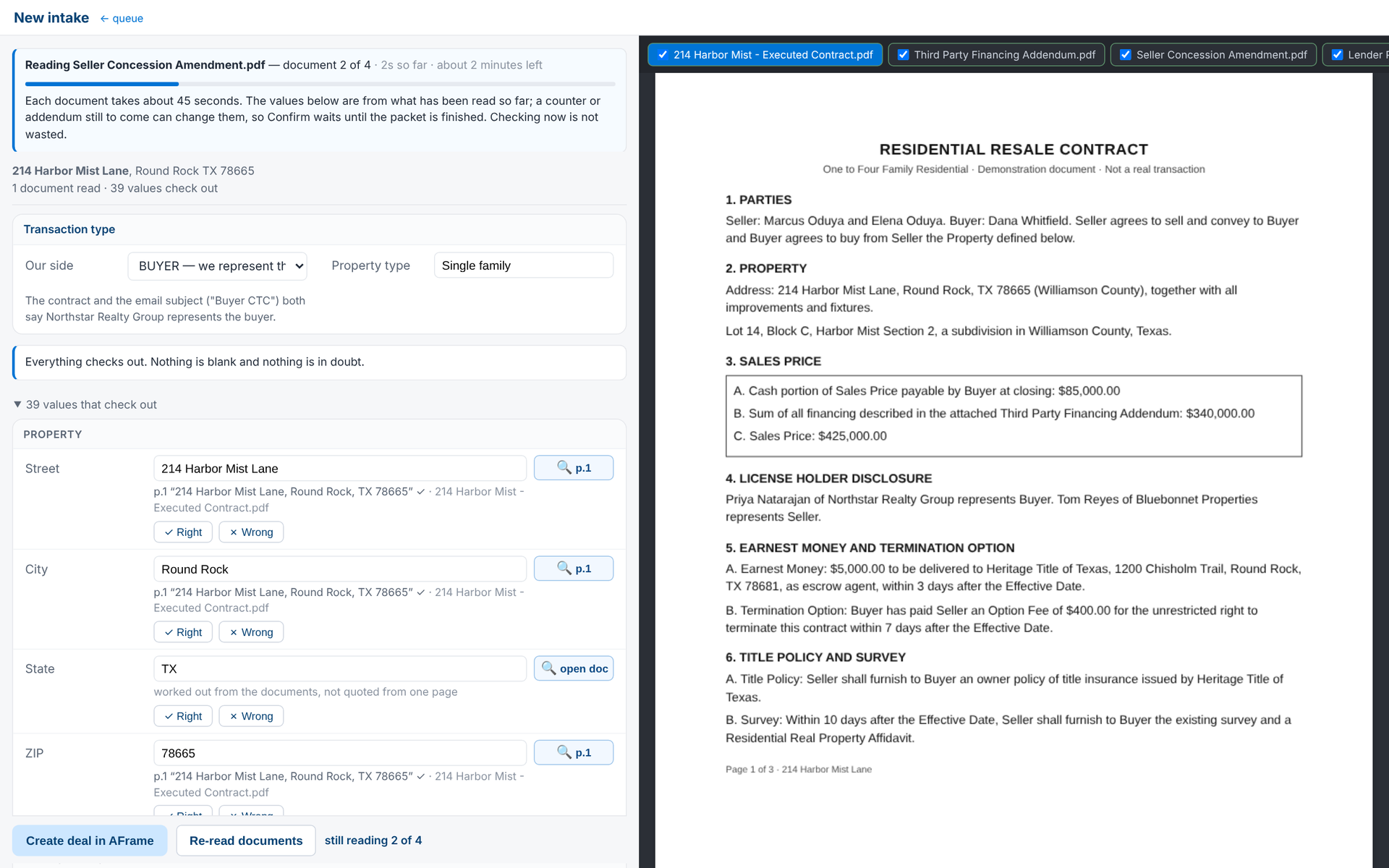
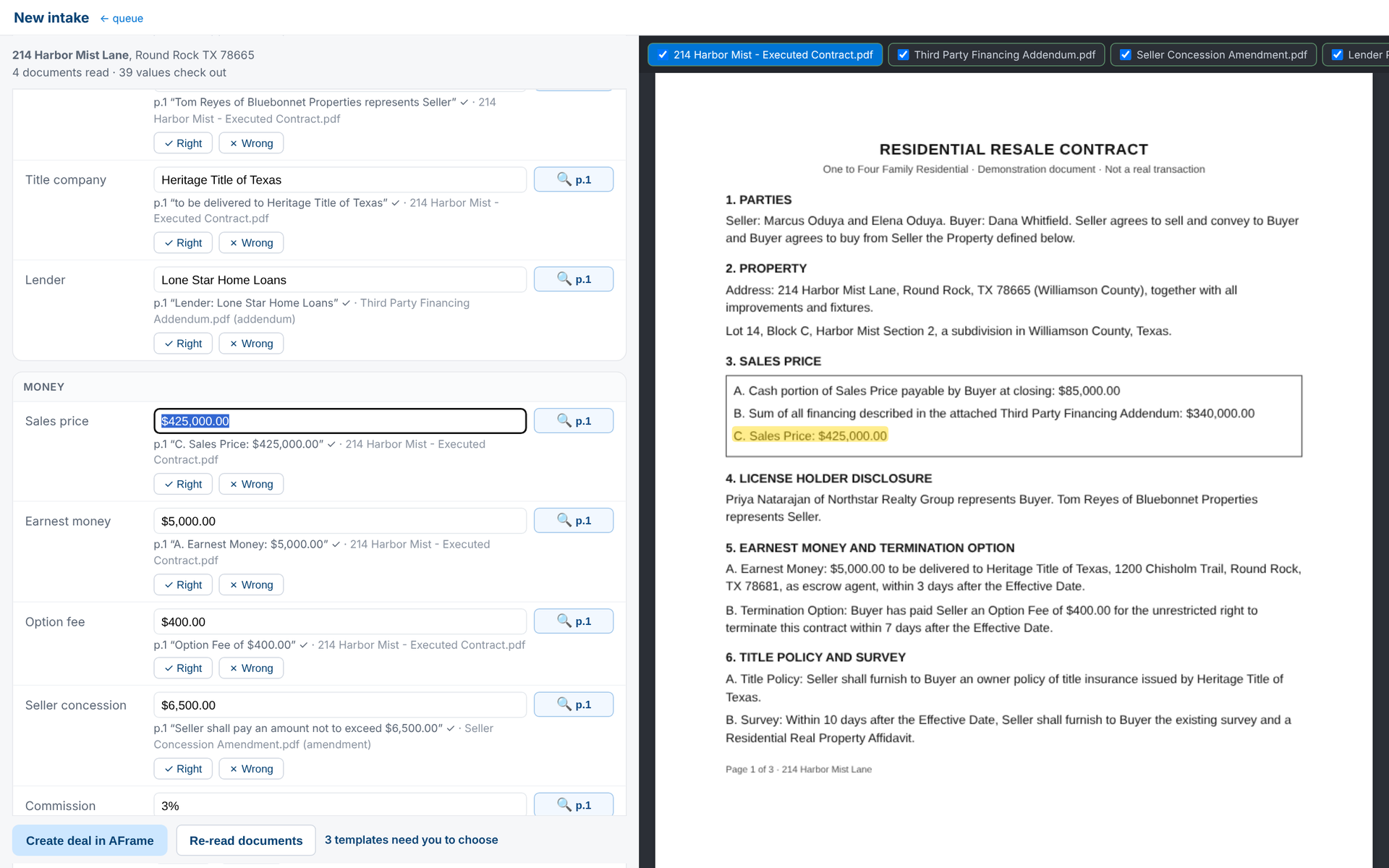
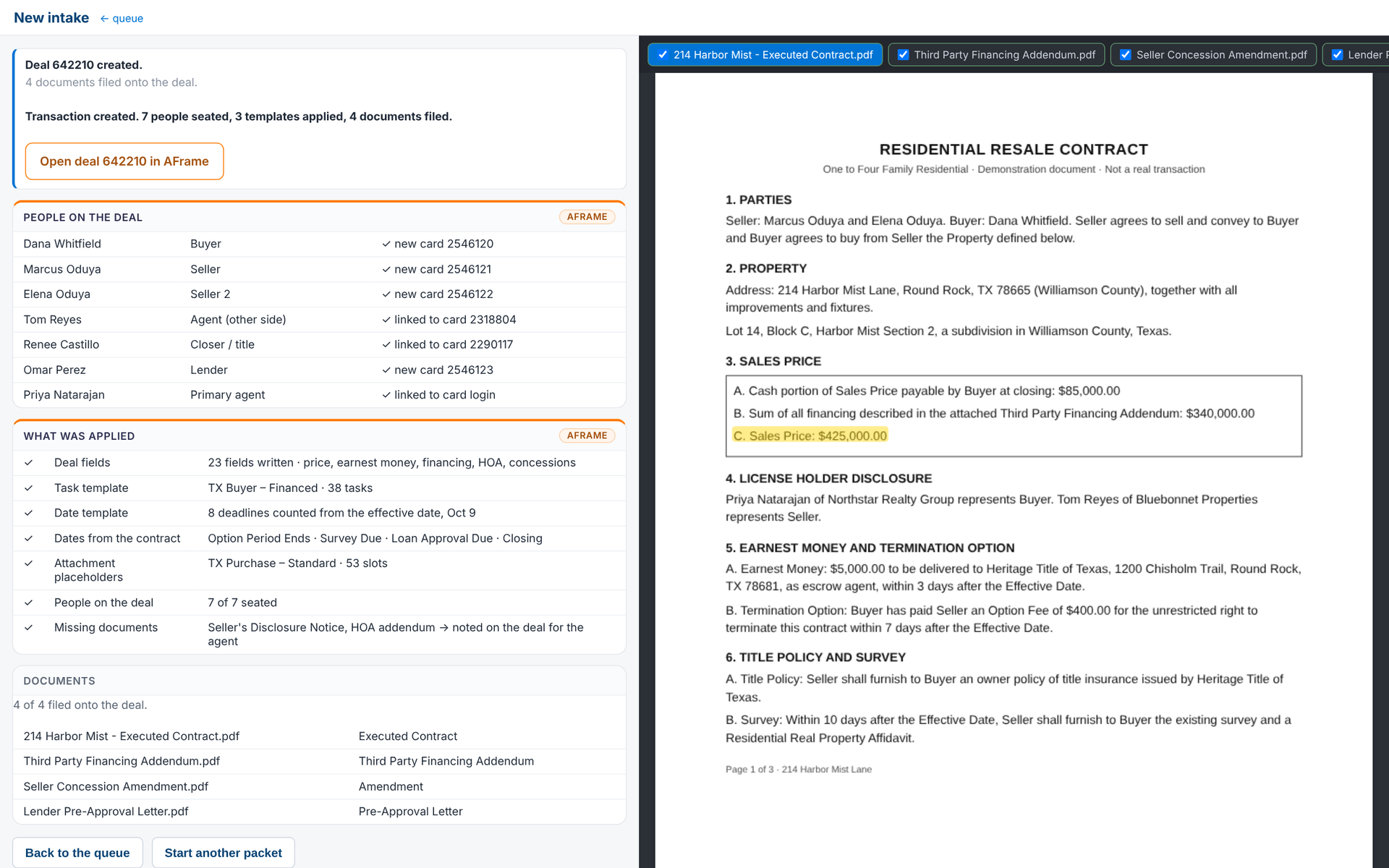
Screenshots of the real review screen on a demonstration file (fictional names and addresses).
Plenty of software says it reads contracts. The difference is what happens when a read is uncertain. Here it is blank and flagged, in front of you, never a guess that slips into your file.
You confirm a handful of values instead of retyping the contract into AFrame. The documents are already split, named and filed.
Each value is checked against the page it came from, by you, in one click. Dates and deadlines go in once, right.
Intake stops being the bottleneck on a busy day. Take on the next file without adding a person to type it.
One address is one transaction, from contract to close. Every amendment, counter and re-read on that transaction is included. Your first month is free with a card on file.
One coordinator, up to about 20 files a month.
Start freeTwo to five coordinators, 25 to 70 files a month.
Start freeTC companies and brokerage operations teams.
Talk to usEvery plan: first month free with a card on file, then billed monthly up front. Included addresses reset each month. A Solo month never costs more than the same month would on Team, so you never pay more than the plan above you. Cancel any month. Two months free when you pay for the year.
Pay as you go. No monthly plan, same product, buy addresses as you need them and they never expire. At 7 addresses a month, Solo already costs less.
Per-file share assumes you charge $300 a file. Enterprise pricing is set with you, so above 74 files the calculator shows the Team plan.
| Files a month | Pay as you go | Solo | Team | Cheapest | Per file |
|---|---|---|---|---|---|
| 3 | $36 | $79 | $179 | Pay as you go | $12.00 |
| 7 | $84 | $79 | $179 | Solo | $11.29 |
| 10 | $120 | $79 | $179 | Solo | $7.90 |
| 15 | $180 | $114 | $179 | Solo | $7.60 |
| 20 | $240 | $149 | $179 | Solo | $7.45 |
| 25 | $300 | $179 (Team price) | $179 | Team | $7.16 |
| 30 | $360 | $179 (Team price) | $179 | Team | $5.97 |
| 40 | $480 | $229 (Team price) | $229 | Team | $5.73 |
| 60 | $720 | $329 (Team price) | $329 | Team | $5.48 |
| 100 | — | — | $529 | Enterprise | Set with you |
If you're new to AFrame, or your setup has grown complicated, we build it with you. You get the templates, task lists and intake routing our own coordinators use, adapted to your state and your forms.
Any plan. For teams opening 75+ files a month, setup is included and a named person on our team runs it with you.
Book a setup callQuote from a Texas beta coordinator lands here after their fifth confirmed deal.
Name, team, city
Quote from an Empower coordinator who uses Filebuilt daily, labeled as ours.
Name, Empower Transactions
One line from AFrame on why they put it on the start-a-transaction page.
Burton Rhodes, AFrame
We say this first so you never find it later. The product is built and run by the Empower team. Your files are never handled by our coordinators unless you ask us to.
You connect it from your own AFrame profile and you can switch it off any time. It can only touch the files you send in.
Nothing about your clients leaves AFrame to go anywhere else. We read contracts and write transactions. That is the whole job.
Your agents and your brokerages are yours. The agreement says so in plain language before you connect.
One transaction on one property, from contract to close. Every re-read, counter and amendment on that transaction is included. If the same property goes under contract again later, that is a new address.
The field is left blank and flagged, and it comes to the top of your review screen. You click the magnifier, see the sentence it was looking at, and type the right value. Your correction teaches it for next time.
If no reviewable deal comes back for a file, that address is credited and not counted against your plan. One wrong field is not a failed read; that is what the review screen is for.
No. Nothing is written until you click confirm. On an amendment, only the rows you tick are written to the file.
No. Your included addresses reset each month, which keeps the bill simple and predictable. If you are regularly over, the plan above costs less per address.
From your account page, any month. Changes take effect at your next billing date.
Your first month is free. You'll go to secure checkout to put a card on file, then the welcome email has your intake address and how to connect your AFrame key.
Rather talk first? Email keith@empower-realestate.com or book a setup call.